What State Really Means in Web Applications
Posted by melllow thomas
Filed in Other 156 views
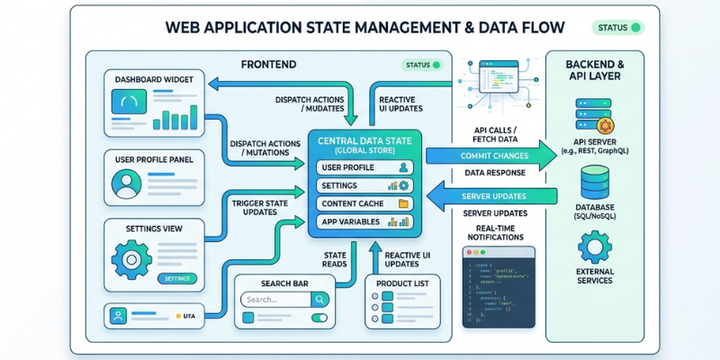
Modern web applications feel fast, interactive, and responsive. This experience is possible because applications constantly track and update information behind the scenes. That information is known as state. In simple terms, state represents the current data that an application uses to decide what users see and how the interface behaves.
State can include many things such as user input, login status, selected items, or content that changes dynamically. When a user interacts with a page, the application updates its state and then refreshes the interface to reflect the change. Developers who understand the state can design applications that respond smoothly to user actions. If you want to build such dynamic applications from the ground up, enroll in the Full Stack Developer Course in Trivandrum at FITA Academy to strengthen your practical understanding of modern web development.
Understanding the Idea of State
State represents the current condition of an application at any given moment. It stores the information that determines how the user interface should appear and behave. For example, when a user adds a product to a shopping cart, the application updates its state to include that product. The interface then reflects the updated cart instantly.
Without state, applications would not remember user interactions. Every action would require a full page reload or a new request to the server. State allows applications to maintain context while users move through different parts of a website. This makes the experience feel smooth and connected rather than fragmented.
State is not limited to visible elements. It can also store background information such as authentication status, user preferences, or data retrieved from a server. Managing this information correctly helps developers build reliable and scalable web applications.
Types of State in Web Applications
Web applications usually handle more than one type of state. Understanding these types helps developers organize data effectively.
Local state refers to data that belongs to a specific component or part of the interface. This type of state often includes user inputs, toggle buttons, or form fields. It usually changes frequently but only affects a small portion of the application.
Global state stores information that multiple parts of an application need to access. Examples include user login details, application themes, or shared data that appears on several pages. Managing global state requires careful planning so that updates remain predictable and efficient.
Server state represents data that comes from a backend service or database. Applications request this data using APIs and store it temporarily on the client side. Developers must keep server state synchronized so the interface always shows accurate information. Many aspiring developers explore these concepts in depth by taking a Full Stack Developer Course in Kochi to build strong practical skills in modern application development.
Why State Management Matters
As applications grow larger, managing state becomes more complex. Poor state management can cause inconsistent data, slow updates, or confusing user experiences. When state changes unexpectedly, the interface may display outdated information.
Good state management keeps the application predictable. Each action performed by the user should result in a clear and traceable state update. This makes debugging easier and improves overall performance.
Modern frameworks emphasize structured state management because it helps developers control how and when data changes. Clear patterns also allow teams to collaborate more efficiently when building large projects.
How State Improves User Experience
State plays a major role in creating smooth and interactive experiences. Features such as live search results, dynamic dashboards, and instant notifications rely on state updates. When the application updates the interface without reloading the page, users feel that the system is fast and responsive.
State also helps applications personalize content. A website can remember user preferences, saved items, or previous actions. This makes the experience feel tailored rather than generic.
Applications that handle state properly can also reduce unnecessary server requests. By storing relevant information locally, the interface can update instantly while still maintaining accurate data.
State is one of the most important concepts in modern web development. It represents the data that controls how an application behaves and what users see on the screen. Understanding state allows developers to build responsive interfaces, manage complex interactions, and maintain consistent user experiences.
Developers who learn how to design and manage state effectively can create applications that scale smoothly as they grow. If you want to gain deeper knowledge and practical experience in building interactive applications, you can consider enrolling in the Full Stack Developer Course in Pune to strengthen your full-stack development skills.
Also check: Caching Fundamentals for Web Applications